Managing a workforce without a clear plan creates chaos. An effective employee shift schedule template is the blueprint for operational success. This guide explores scheduling types, calculation formulas, and how terra automates the process for maximum efficiency.
What Is an Employee Shift Schedule template?
An employee shift schedule template is a pre-formatted digital tool or document used to assign, track, and coordinate staff working hours over a specific period. It ensures that all critical roles are covered during operating hours while maintaining compliance with labor laws and optimizing labor costs.
For new hires still in their probation period, this schedule provides crucial structure, helping them integrate into the team workflow without confusion.
Key components of a standard template
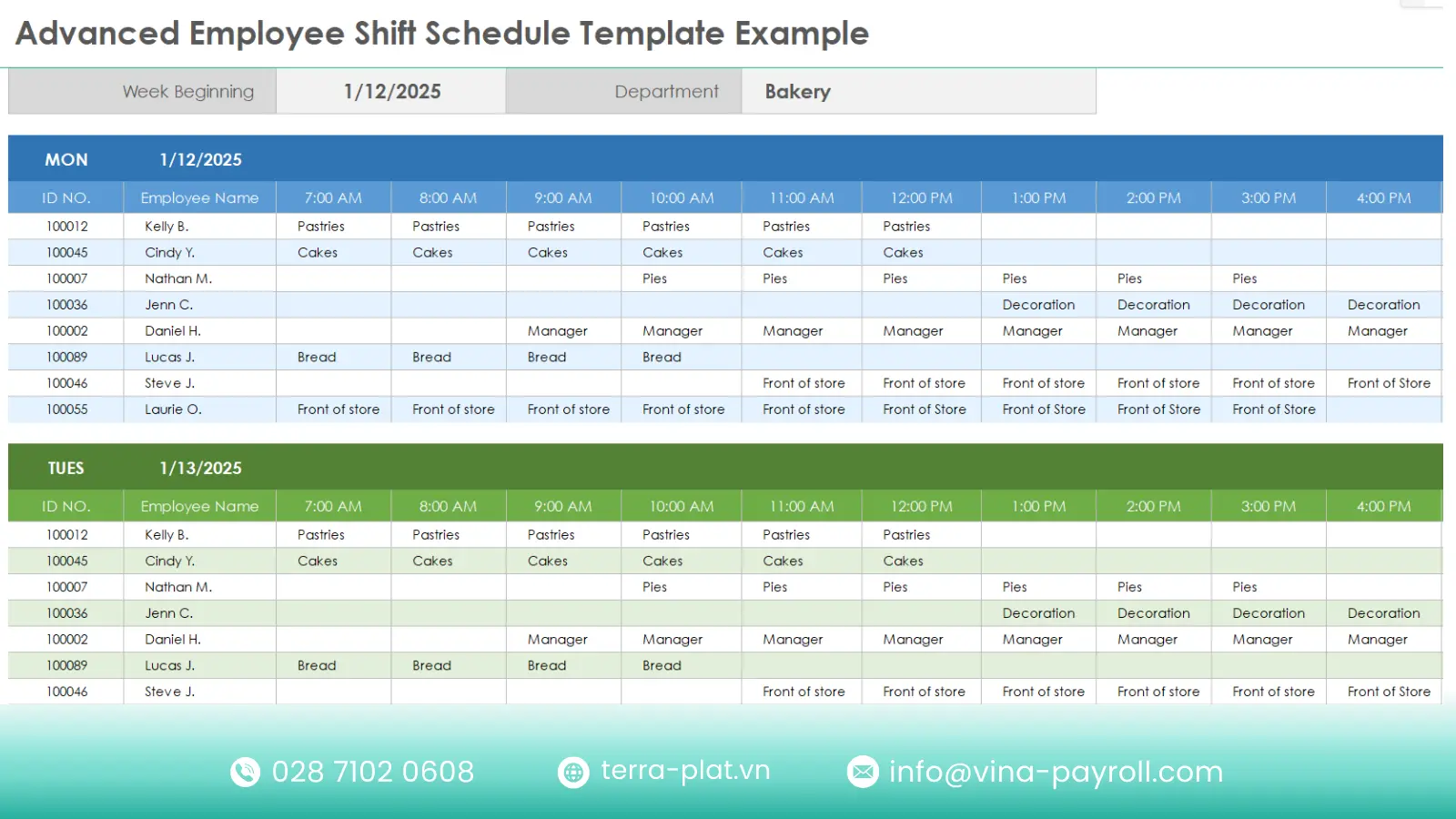
To be effective, a template must provide all necessary information at a glance. A comprehensive employee shift schedule template typically includes:
- Employee Names & IDs: Clearly identifying who is working.
- Dates and Days: Usually covering a specific week or month.
- Shift Times: Start and end times (e.g., 08:00 – 17:00).
- Roles/Positions: Specifying if the person is acting as a manager, server, or technician.
- Location: Critical for businesses with multiple branches.
Who typically uses these templates?
While corporate office jobs often follow a predictable 9-to-5 pattern, many sectors operate on extended hours or 24/7 cycles. For these industries, a static roster is insufficient. They rely heavily on dynamic employee shift schedule templates to balance operational demands with workforce availability.
- Retail & Hospitality: Restaurants, hotels, and retail stores face fluctuating customer footfall based on the time of day and season. They use these templates to manage a mix of full-time and part-time staff, ensuring high staffing levels during peak rush hours while cutting back during slow periods to protect profit margins.
[Download Retail & Hospitality Shift Schedule Template]
- Healthcare & Emergency Services: Hospitals, nursing homes, and fire stations never close. They require strict 24/7 coverage where a gap in the schedule can be a matter of life and death. Templates are essential here to manage rotating 12-hour shifts, monitor nurse-to-patient ratios, and prevent burnout among critical care staff.
[Download Healthcare & Emergency Services Shift Schedule Template]
- Manufacturing & Logistics: Factories often aim for maximum machine uptime to ensure profitability, running continuously on a 3-shift model (Morning, Afternoon, Night). Plant managers use these templates to organize hundreds of workers into teams, ensuring seamless handovers between production cycles and minimizing downtime.
[Download Manufacturing & Logistics Shift Schedule Template]
- Customer Support (BPO): Call centers serving global clients must operate across multiple time zones. Managers use shift templates to align agent availability with peak call volumes in different regions, ensuring that a customer calling from the other side of the world still reaches a live support agent.
[Download Customer Support Shift Schedule Template]
Why your business needs a shift schedule template
Relying on memory or scribbled notes to manage staff is a fast track to operational failure. Implementing a structured employee shift schedule template solves several fundamental business pain points.
Ensuring continuous operations
For businesses that run beyond the standard 9-to-5, gaps in the schedule mean lost revenue. A solid template ensures there is never a dark hour where a critical station is unmanned. Advanced tools like the terra HR Platform can even predict these gaps before they happen.
Reducing scheduling conflicts and confusion
Double-booking an employee or scheduling someone when they are unavailable creates friction. A visible, shared schedule serves as the single source of truth, eliminating the “I didn’t know I was working” excuse.
Improving labor cost efficiency
Overstaffing leads to wasted budget, while understaffing leads to overtime costs and burnout. By visualizing the employee shift schedule, managers can align staff counts with predicted traffic, a feature often optimized by a specialized shift scheduling program.
Enhancing employee satisfaction and fairness
Employees value predictability. A clear schedule allows them to plan their personal lives. Furthermore, a transparent template shows that shifts (especially unpopular ones like weekends) are distributed fairly, a process easily managed by the terra hr management system.
Common types of employee shift schedules
One size does not fit all. Depending on your industry and operational hours, you will need to select the model that fits your specific needs..
Fixed shift schedule
- Description: In this model, employees work the same set hours every single day, such as the standard 9-to-5 or a specific night shift that never changes. This offers maximum stability, allowing staff to build a consistent routine around their work life and making payroll calculations straightforward.
- Best for: Corporate offices, administrative roles, and businesses where consistent team collaboration during core hours is critical.
Rotating shift schedule
- Description: Employees cycle through a pattern of different shifts working the day shift for a week, then the afternoon shift, and finally the night shift before the cycle repeats. This rotating shift schedule is crucial for fairness, ensuring that no single group of employees is permanently stuck working undesirable hours (like overnight) while ensuring the business operates 24/7.
- Best for: Manufacturing plants, hospitals, and law enforcement agencies where continuous coverage is mandatory but “bad” shifts need to be shared equally.
Split shift
- Description: An employee’s workday is divided into two distinct blocks of time separated by a long break (usually 3 to 4 hours) that is unpaid. For example, a server might work from 10:00 AM to 2:00 PM for the lunch rush, leave, and return from 6:00 PM to 10:00 PM for the dinner service. This maximizes labor efficiency during peak demands without paying for idle time.
- Best for: Restaurants with distinct meal services, school bus drivers, and public transportation sectors.
On-call shift
- Description: Employees are not physically present at the workplace but must remain reachable and ready to report to work immediately if an emergency arises. These workers typically receive a retainer fee for being available, plus their standard hourly rate if they are actually called in to work. This model provides a safety net for unpredictable operational failures.
- Best for: IT support teams, emergency medical technicians, and facility maintenance crews handling critical infrastructure.
Hybrid or customized shift models
- Description: This flexible approach combines a core team working fixed hours with a layer of variable staff whose hours fluctuate based on demand. For instance, full-time managers might work 9-5, while part-time sales associates are scheduled based on projected foot traffic for that specific week. This allows businesses to scale labor costs up or down instantly.
- Best for: Retail stores during holiday seasons, event management companies, and logistics hubs facing volatile shipment volumes.
| Shift type | Key Characteristics | Best for |
| Fixed Shift | Employees work the same set hours every day (e.g., 9-to-5). | Corporate offices, Administrative roles. |
| Rotating Shift | Staff cycle through morning, afternoon, and night shifts. | Manufacturing, Hospitals, 24/7 Security. |
| Split Shift | A workday split into two blocks with a long unpaid break. | Restaurants (Lunch & Dinner rush), Logistics. |
| On-Call Shift | Employees remain reachable and ready to report if needed. | IT Support, Emergency Services, Maintenance. |
Read more: Best 10+ employee time and attendance software

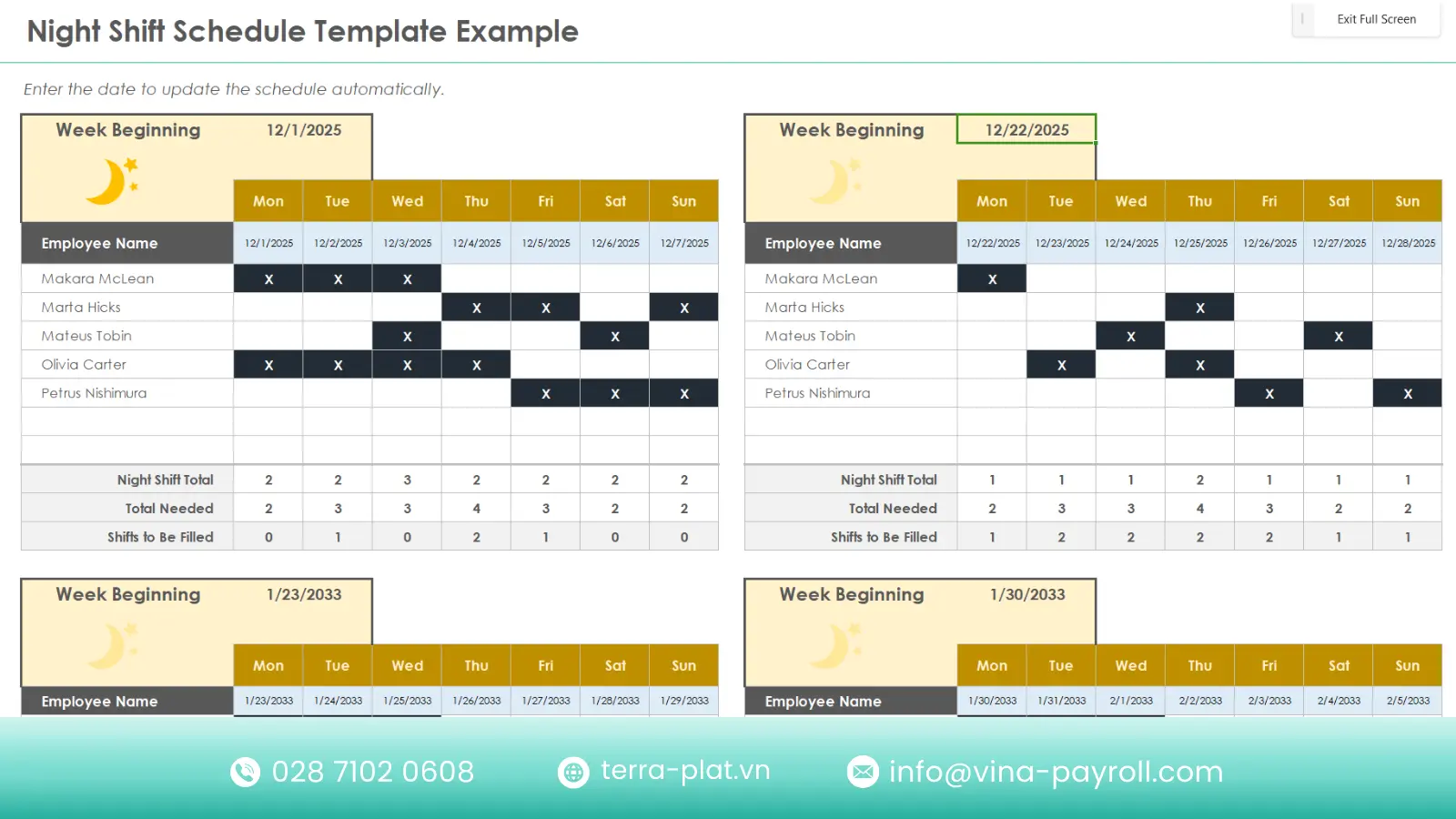
Free weekly employee shift schedule template
For small businesses or startups not yet ready for a full software suite, a spreadsheet is a great starting point.
What’s included in the weekly template
This is not just a blank grid. Our pre-configured employee shift schedule template includes smart features designed to prevent scheduling errors:
- Role-Based Layout: A dedicated column to specify if the employee is a Manager, Server, or Cook, ensuring you don’t accidentally schedule a shift with no leadership.
- 7-Day View with Breaks: The weekly view includes columns for Start Time, End Time, and Unpaid Break deductions for every day (Monday–Sunday).
- Automated Hour Calculator: The final column automatically sums up “Total Billable Hours” for the week. This is critical for spotting overtime before it happens.
- Notes Section: A space to record leave requests, shift swap agreements, or specific daily tasks.
How to download and customize
You can easily find a free weekly employee shift schedule template excel online or create one using Google Sheets. This is expert tips for customization:
- Freeze the panes: We have locked the top row (Days) and the first column (Names). This ensures that even if you have 50 employees, you can scroll through the schedule without losing track of who you are looking at.
- Apply conditional formatting: We recommend setting rules to color-code cells based on roles (e.g., set cells containing Manager to turn Blue). This allows you to visually scan the roster to ensure every shift has a leader.
- Protect formulas: Lock the Total Hours cells to prevent staff from accidentally deleting the formulas that calculate their pay.
[Download 6 Free weekly employee shift schedule template]
When a weekly format is most effective
A weekly template is superior to monthly planning for businesses with high volatility, such as retail stores or restaurants.
- Flexibility: It allows managers to adjust staffing levels based on the previous week’s sales performance or weather forecasts.
- Responsiveness: In industries with high turnover or frequent student part-timers, a weekly cadence aligns better with changing personal availability than a rigid monthly roster.
How to create an effective employee shift schedule
Building a schedule is more than just filling in boxes; it is a logic puzzle. Here is a step-by-step guide to doing it right, potentially using the terra hr management system to streamline the process.
Step 1: List roles and staffing requirements
Before assigning names, you must define the empty slots that need filling based on data, not intuition.
Identifying peak and low-demand hours
Stop guessing when you are busy. Analyze your Point of Sales (POS) data or foot traffic counters to identify hourly trends. If Friday night between 6 PM and 9 PM accounts for 40% of your daily revenue, your employee shift schedule template must reflect double staffing density during this window compared to the Tuesday morning lull.
Mapping skills to required positions
A shift is only effective if the right skills are present. You cannot schedule three junior trainees without a supervisor. Create a “Skills Matrix” to track who is qualified for what (e.g., who has a “Server” badge vs. a “Manager” badge). Modern recruitment software often helps track these certifications, ensuring every shift has the necessary leadership and technical expertise.
Step 2: Define shift lengths and patterns
The duration of your shifts dictates how many handovers occur and how tired your staff gets.
Typical shift durations (6h/8h/12h)
- 8-Hour Shifts: The standard 5-day workweek model. It reduces fatigue but requires three distinct teams to cover a 24-hour cycle.
- 12-Hour Shifts: Common in healthcare and manufacturing. The advantage is fewer weekly handovers (reducing communication errors) and more days off for staff (e.g., 3 days on, 4 days off). However, fatigue risks are higher.
Rules and labor compliance considerations
You must account for mandatory breaks. For example, an 8-hour shift typically requires at least one unpaid meal break and two paid rest breaks. Failing to schedule these gaps leads to legal penalties.
Step 3: Assign employees to shifts
Balancing fairness with operational needs
Nothing kills morale faster than favoritism. Keep a log of who worked the last major holiday or the graveyard shift. If Employee A worked Christmas, Employee B should work New Year’s. Use the HR platform to view historical data, ensuring bad shifts are rotated equitably among the team.
Avoiding burnout (especially in rotating shifts)
The Clopen is a recipe for burnout. In a rotating shift schedule, always rotate forward (Day -> Afternoon -> Night) rather than backward, and ensure a minimum 12-24 hour rest period when switching cycles to protect circadian rhythms.
Step 4: Validate, publish, and update
Best practices for communicating schedules
Publish the employee shift schedule template at least 14 days in advance. This respects your employees’ personal lives and reduces absenteeism. Send it via multiple channels (email, app, notice board) to ensure receipt.
Preventing last-minute changes
Require staff to find their own replacements for non-emergency absences. Using software streamlines this by allowing employees to trade shifts digitally with manager approval, eliminating the chaos of group chat negotiations.
Formula-Based scheduling: How to predict staffing needs
To move beyond guessing, use mathematical formulas to determine exactly how many people you need. The terra HR Solution often has these calculations built-in.
Basic formula for calculating staffing demand
This formula calculates the total headcount needed to cover a fixed workload while accounting for shrinkage (time paid but not working, like breaks).
Required staff
| Required staff | = | Total Workload Hours __________________ Shift Length | x | 1 + Allowance Factor) |
Allowance Factor: Typically 1.2 (adding 20% buffer for breaks/absenteeism).
Example for peak-hour coverage
- Scenario: You need 40 hours of cashier coverage daily.
- Math: (40 / 8) x 1.2 = 6.
- Result: You need 6 employees scheduled to ensure 5 are always active on the floor while 1 is on break.
Formula for rotating shift allocation
For 24/7 operations, calculate how many teams are needed to cover 168 hours/week.
Number of teams
| Number of teams | = | Total Hours to Cover __________________________ Weekly Hours per Person |
Example of a 3-team rotating model
- Math: 168 hours / 40 hours = 4.2.
- Result: You cannot run a 24/7 plant with just 3 teams without massive overtime. You mathematically need 4 full teams (and often a partial 5th team or floaters) to rotate effectively without violating labor laws.

Frequently asked questions (FAQs) about employee shift schedule template
Below are expert answers to the most common questions business owners ask when transitioning from manual methods to structured employee shift schedule templates.
How can I move from paper to digital shift templates?
Answer: Start by auditing your current roster and inputting the data into a cloud-based spreadsheet like Google Sheets.
Paper rosters get lost and are hard to update. A digital template allows real-time sharing. Eventually, scaling businesses should migrate to an automated system to handle complex recurring patterns.
Do Excel templates ensure labor law compliance?
Answer: Manual templates do not; they require manual data entry which is error-prone.
An Excel template is a static document. You must manually type hours into your payroll software. Only dedicated HR software integrates these two, automatically pushing hours worked to payroll to calculate wages instantly.
How are employee schedule templates different from scheduling software?
Answer: Templates are passive documents; software is an active management tool.
A template relies on you to type in names and check for conflicts visually. Shift scheduling software actively alerts you to conflicts (e.g., “John is already working”), tracks overtime laws, and enables mobile clock-ins.
How can I make sure employee schedule templates follow labor laws?
Answer: You must strictly memorize local regulations regarding breaks and maximum hours.
With a template, the compliance burden is 100% on you. You need to manually verify that no employee is scheduled for more than the legal limit (e.g., 48 hours/week). Automated tools build these rules into the system logic.
Can employee schedule templates manage remote team schedules effectively?
Answer: Yes, provided they are cloud-based and use clear time zone markers.
For remote teams, use a shared live document. Ensure you add a column for Time Zone so a meeting scheduled for 9 AM EST isn’t missed by a developer in Vietnam.
What employee schedule template format is best for small businesses?
Answer: A weekly view in Excel is usually the gold standard.
Monthly views are too rigid for small businesses where demand fluctuates. A weekly view offers the right balance of planning visibility and agility to adjust to immediate changes.
terra HR system: All-in-one support for your HR department
While spreadsheets are great for starting out, growing businesses face complexity that manual templates cannot handle. terra offers a sophisticated solution that evolves your HR operations from manual entry to strategic automation – terra HR System.
- BPaaS Model (Business Process as a Service): Unlike standard software that you just buy and figure out, terra HR Software combines cloud technology (SaaS) with expert operational support. This unique model helps businesses save up to 80% of payroll operating costs by outsourcing the heavy lifting of calculations and compliance.
- Speed & Compliance: The terra HR system processes payroll and scheduling data 3x faster than manual methods. More importantly, it guarantees 100% legal compliance, protecting you from fines associated with overtime miscalculations or tax errors.
- Integrated Ecosystem: It’s not just about scheduling. terra provides an integrated platform where your shift schedule talks directly to time-attendance, social insurance management, and PIT finalization.
- Trusted Reliability: With over 200+ FDI clients across various industries, terra HR Platform is a proven partner for stabilizing workforce management.

Contact terra HR Solution now for advice!
Summary
Whether you use a simple free weekly employee shift schedule template excel or upgrade to the automated power of the terra HR Management system, the goal remains the same: putting the right people in the right place at the right time. By mastering these logical steps and formulas, you turn scheduling from a headache into a competitive advantage.